

A catalogue works best when it helps customers find the right product quickly, rather than trying to show everything at once. If you’re planning how to make a catalogue for your business, start by defining its audience, choosing a print, digital or mobile format, and organising product details into clear categories. Include useful information such as product names, descriptions, features and pricing.
A well-made catalogue helps customers browse your products and understand what you offer. The challenge is bringing the content, design and format together so the result is clear, consistent and true to your brand.
This guide explains what to include, how to choose a format and design, and what to consider when preparing a catalogue for print or digital use. You’ll also learn how professional production can turn product information into a practical, cohesive catalogue.
Key Takeaways
- See which product details help customers understand and compare what you offer.
- Choose a catalogue format that suits your audience and how they browse.
- Learn how professional design support can shape the layout and make extensive product ranges easier to navigate.
- Understand how consistent colours, imagery and typography help the catalogue reflect your brand.
- Find out what a catalogue provider can manage when preparing files for print, download or digital publishing.
What is a Product Catalog, Anyway?
A product catalogue is an organised guide to what a business sells. It brings product names, descriptions, prices, sizes, materials and images together in one place. Customers should be able to find an item, understand its key features and see its price without searching through unrelated information.
Start with how customers will browse. A furniture catalogue, for example, can group chairs, tables and storage, then show each item’s dimensions and materials. A clothing catalogue might organise products by garment type, size or colour. Clear categories help customers narrow their choices, while consistent descriptions make products easier to compare.
Categories describe broad groups, such as kitchenware or office supplies. Attributes add useful details within each group, such as colour, material or size. According to the World Health Organization, a digital product catalogue system should define categories and attributes to organise product information. This structure also helps keep product records consistent across a catalogue platform.
- Product name: Use the name customers recognise, such as “Oak dining chair,” rather than an internal stock label alone.
- Description: Explain the item’s purpose, materials and distinguishing features in direct language.
- Price and options: Show the relevant price and clarify which size, finish or configuration it applies to.
- Specifications: Include practical details such as dimensions in mm, colour choices or care information where relevant.
For catalogues aimed at South African customers, keep product descriptions, prices and promotional claims accurate and clear. Use original images and text, or material you have permission to reproduce. These checks help prevent misleading information and unauthorised use of someone else’s work.
Product images should show the item clearly and match the description. A photograph of a black cotton shirt, for example, should not represent a different colour or material. For a product catalogue photograph, the World Health Organization specifies standard web quality of approximately 1,000 × 1,000 pixels in a 1:1 square aspect ratio.
A catalogue designer can organise your product information into a consistent page layout. Names, descriptions, prices and images can be aligned, with related items grouped so customers can scan each section quickly. If a product comes in several finishes, place each option beside its matching image and specifications to help distinguish similar items.
Before layout begins, prepare a product list with approved names, current prices, descriptions, sizes, materials and image files. Label images with the corresponding product name or code. This gives the design team a clear reference, supports accurate placement and helps identify missing details before the catalogue is finalised.
Print, digital and mobile catalogue formats
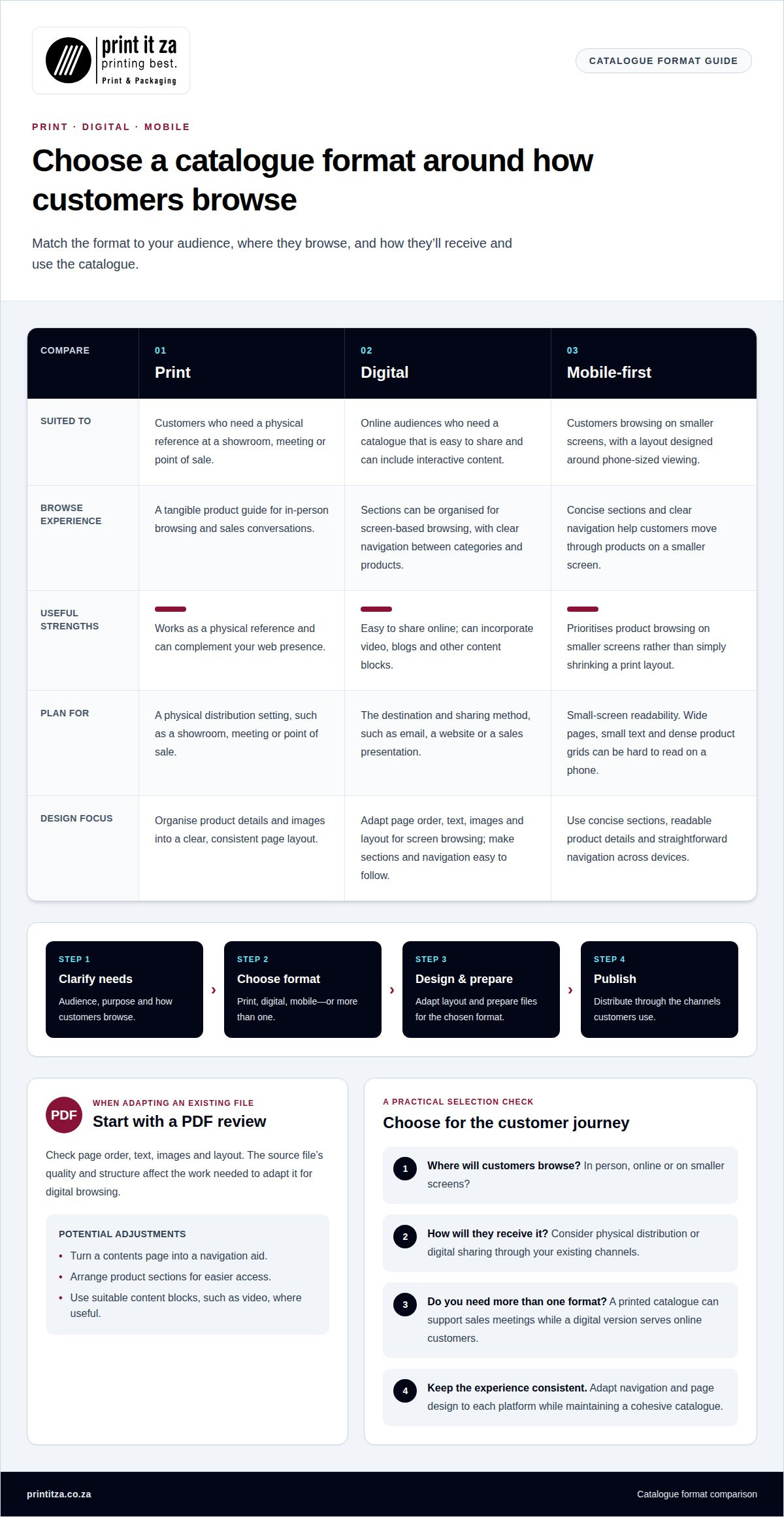
Choose a format based on where customers browse, what they need to do and how they’ll receive the catalogue. The process typically involves clarifying these needs, choosing print, digital or mobile formats, developing the design, preparing files and publishing the finished catalogue.
Format Selection
Compare formats against your audience and distribution plan. A printed catalogue suits customers who need a physical reference at a showroom, meeting or point of sale. A digital version is easy to share online and can include interactive content. A mobile-first layout prioritises browsing on smaller screens. The right choice depends on how customers will find products and use the information.
Some projects benefit from more than one format. A business might use a printed catalogue for sales meetings and a digital version for online customers. Consider the catalogue’s purpose, content, image layout and update needs before choosing a format. This helps maintain a consistent experience while adapting navigation and page design to each platform.
Creating a Catalogue from a PDF
An existing PDF can be a starting point for a digital catalogue. Review its page order, text, images and layout, then adapt elements for screen-based browsing. For example, a contents page can become a navigation aid, while product sections can be arranged for easier access. The source file’s quality and structure affect the work needed to adapt it.
A PDF designed for print may be difficult to browse on a phone. Small text, wide pages and dense product grids can make details hard to read. A designer can adjust the digital layout, improve navigation and use suitable content blocks, such as video, to support a more engaging product journey. Make key information easy to find across devices.
Digital Catalogue Publishing and Sharing
Before publishing, prepare the final digital file and check that its pages, links and product information work as intended. Organise sections so customers can move from a category to relevant products without losing their place. A clear file name and opening page also help recipients understand the catalogue when it arrives by email or message.
Digital catalogues can be shared through channels your business already uses, such as email, a website or a sales presentation. A professional can prepare the files for those uses and make sure the chosen version suits its destination. For instance, a sales team may need a convenient file to share during a meeting, while online visitors need straightforward access from a product page.
Print remains useful when customers need a physical reference or sales conversations happen in person. Digital catalogues suit online audiences and can incorporate video, blogs and other content blocks. A printed catalogue can also complement your web presence. Choose the format based on customer behaviour, then align the design and distribution method with it.
For mobile browsing, concise sections and clear navigation work better than shrinking a print layout to fit a screen. Adapt the page hierarchy, product panels and links to make browsing more natural on a phone. If the catalogue serves mobile and desktop readers, test its layout on different screen sizes to spot cramped text or navigation.
Choosing and customizing catalog templates
A template gives a catalogue its starting structure, but the audience and products should shape the finished design. If you’re considering how to make a catalogue for my business, begin by defining who will use it and what they need to find. A professional can then adapt the layout to support those needs.
Page Size and Orientation
Choose page size and orientation to suit the products, content and intended use. A portrait layout can suit a product guide with stacked descriptions, while landscape pages can give furniture or equipment more room. The design should also suit the distribution plan, whether customers will browse printed pages, a screen or both.
Page dimensions affect how much space each product gets and how the catalogue feels to use. Balance image area, text, navigation and page count instead of choosing a format by appearance alone. A catalogue with wide product photographs, for example, may need a different layout from a compact price guide.
Catalogue Design Tools
Design professionals use page-layout software to build a consistent grid, typography system and reusable page templates. A master page can keep recurring elements, such as page numbers and section labels, aligned throughout the catalogue. This structure helps the designer update product pages without creating uneven spacing or disrupting the visual rhythm.
Templates provide a framework, not a finished design. Adapt them to the audience, product range and brand identity, then check how sample pages handle different content. A text-heavy technical section may need a different balance from a visual product spread. This keeps the catalogue cohesive while giving each section room to communicate clearly.
Image and Layout Practices
Give each product image a clear role and keep related details nearby. A repeatable image position, product heading and description area help readers compare similar items across a page. Consistent spacing and alignment make the catalogue easier to scan, while varied page compositions can highlight featured products without disrupting navigation.
Images should be clear, relevant and consistent with the products they represent. Consider cropping, background and scale so products remain easy to recognise. A close-up can show material texture, while a wider view presents the complete item. Strong contrast between text and background also helps readers follow descriptions and calls to action.
Define the audience before making design decisions. A catalogue for business buyers may foreground specifications and ordering details, while a consumer catalogue may prioritise product benefits and visual appeal. A professional design service should translate your audience, purpose and branding into a practical layout, with proofs shared for review before final files are prepared.
Understanding how to make a catalogue for my business also means planning how its design supports recognition. A designer can compare sample pages against existing brand materials, looking for mismatched colours, inconsistent heading styles or image treatments that weaken the overall effect. Reviewing those details before production helps create a cohesive catalogue. For professional catalogue design support, a collaborative review can turn these decisions into a polished, usable result.
Applying your brand colours and identity in a professionally designed catalogue
A catalogue should feel like a natural extension of your business, not a separate brand. Use your existing logo, colour palette, typography and image style to create a consistent identity across product pages, section dividers and covers.
Colour has a practical role as well as a visual one. A retailer with a navy-and-gold identity might use navy for headings and gold for small highlights, while keeping product photographs clear. Balance brand colours with backgrounds and text contrast so readers can scan descriptions without visual clutter.
Typography needs the same discipline. A professional can set a clear hierarchy for product names, descriptions, prices and section titles, then apply it throughout the catalogue. For example, a bold heading can identify a product range, while a simpler body style keeps longer specifications readable. Consistent spacing also helps each page feel connected.
Brand identity includes imagery as well as colours and type. Align photographs, illustrations or line art with the visual style your business already uses. If an online commerce brand relies on clean product photography, a busy decorative treatment may distract readers. A restrained layout keeps attention on products and their details.
- Logo placement: Keep the logo visible on covers and key navigation pages without crowding product information.
- Colour use: Apply the same palette to headings, dividers and callouts across related sections.
- Typography: Use defined styles for product names, descriptions and supporting details.
- Image treatment: Keep crops, backgrounds and illustration styles consistent with the brand.
Design choices should support the catalogue’s purpose. A trade catalogue may use a direct, information-led style, while a lifestyle range can give larger images more space. Adapt the visual balance to the audience while keeping the core identity intact. This lets featured products stand out without making other pages feel unrelated.
For print and digital use, the brand system should hold together across each version. A digital catalogue may include interactive links or navigation, while a printed edition uses page structure and visual cues to guide readers. In both, recurring colours and type styles help customers recognise your business as they move between sections.
Review sample pages against your existing brand materials before finalising the full catalogue. Look for mismatched colours, inconsistent heading styles and image treatments that weaken recognition. Resolving these details early gives the catalogue a cohesive finish, whether it supports retail browsing, business sales or online commerce.
Professional printing, downloading and publishing of catalogs
A catalogue reaches customers only when its files are prepared for their intended use. A professional coordinates the final artwork, print production and digital publishing so each version can showcase products clearly. The key is matching the output to its destination, whether that’s a printed handout, downloadable PDF or online catalog.
For print, the provider prepares pages for the selected format and checks that images, text and page order are consistent. The professional also checks that important content sits safely within the layout and that the finished pages are ready for the chosen print method.
Before printing, review a proof of the catalogue as a complete piece. Look for issues such as a product appearing beside the wrong description, a missing page or a heading that is difficult to read. Correcting these details at the proof stage helps prevent errors in the final copies.
Digital delivery has different priorities. A downloadable PDF can preserve the design and be shared by email or uploaded to a website. Catalogue content can also be adapted for online browsing, where navigation, links and screen readability matter. A print-ready file and a digital file serve different purposes, so one should not automatically replace the other.
- Prepare: Finalise the page order, product information and approved artwork.
- Proof: Review the complete file for layout, content and consistency.
- Produce: Prepare the approved print file for production or export a digital version.
- Publish: Upload or share the file through the channel selected for customers.
For an online catalogue, organise sections and links to help readers move between product groups. A downloadable catalogue may suit a sales team sharing a reference during meetings, while an online version can serve customers browsing a business website. Keep the content consistent even when navigation changes between formats.
Keep a final approved version as the source for future updates. When product details change, the provider can work from the current files and update affected pages, rather than rebuilding every element. Clear file names and version control also help staff share the right catalogue with customers and avoid circulating outdated information.
For a catalogue that’s ready to print or publish, prepare your catalogue for professional printing with a production partner.
Print It ZA print and packaging
Print It ZA produces catalogues in-house, alongside books, brochures and retail packaging. These offerings support businesses creating coordinated materials for customers, sales teams or retail settings. Turn to the team when you’re ready to produce a catalogue and want professional printing as part of the process.
To get started, prepare approved catalogue content, product details and design files. Information about the intended format and use helps shape the production discussion, whether the catalogue will support in-person sales or complement other printed materials. Choose a final format that suits your audience and how they’ll use it.
For a catalogue project, contact Print It ZA print and packaging to discuss your requirements.
Move your catalogue project forward
Knowing how to make a catalogue for my business is only the starting point. Turn your decisions into a production-ready brief by setting out the catalogue’s purpose, audience, preferred format, brand assets, product content and distribution plan. Include where customers will encounter it and what action you want them to take. A clear brief helps the creative team develop a direction that fits your business and keeps decisions focused.
Print It ZA produces catalogues alongside books and brochures, helping businesses create coordinated printed materials. Share your project requirements and preferred direction to start a focused discussion about next steps. Clear priorities make it easier to move from an idea to a catalogue ready for customers.
Contact Print It ZA print and packaging to discuss your catalogue project. A clear brief is a practical first step toward a catalogue that serves your business well.
Frequently Asked Questions
How much does it cost to make a catalog?
The cost depends on the catalogue’s scope and production choices, so there isn’t one price for every project. Page count, print quantity, paper, finishing, design complexity and digital file requirements all affect the work involved. Define what the project needs and request a quote. This makes it easier to see how changes, such as a different finish or format, affect the overall scope.
What information should a business catalogue include?
Include the details customers need to identify and assess each item, along with practical information for an enquiry or purchase. A supplier could add product codes and ordering instructions, while a clothing business might include care guidance and available variants. Add your business name and a clear way to enquire. Keep information current, especially when stock, availability or product specifications change between editions.
How can I choose the best catalogue format: print, PDF, or online, with professional guidance?
Choose based on how customers will use the catalogue and where they’ll encounter it. A sales representative meeting clients may benefit from a printed copy, while a PDF is easy to send directly. An online catalogue can suit customers who browse through a website. A design professional can assess the content, distribution plan and need for interactive features, then recommend a format or coordinated versions for different situations.
How much does it cost to design and print a catalogue in South Africa?
Design and printing costs vary with the project’s content, format and production specifications. A catalogue with custom page layouts may involve different design work from one using an established visual system. Print quantity, paper choice and finishing also affect production. In South Africa, request a project-specific quote in rand, with design and printing scope shown clearly. This helps you understand what’s included and compare adjustments before approving production.
How should I price products and display VAT in a South African catalogue?
Use prices in rand and make the VAT treatment clear and consistent throughout the catalogue. Label whether displayed prices include or exclude VAT, and avoid mixing approaches across product pages. For example, a product table should present prices consistently in every category. Keep promotional prices and terms precise, and ensure figures match the information your business uses when customers enquire or place an order.


