Could the wrong fold make a strong message harder to follow? A brochure should be easy to open, scan and keep, not simply look attractive. If you’re weighing a folded brochure against a multi-page booklet, or deciding how size, paper and finish will suit your content, start with how readers will use it. Effective custom brochure printing begins with the message and the reading experience you want to create.
This guide will help you match the format and fold to your information, choose between A4, A5 and DL sizes, and prepare artwork with fewer avoidable surprises. You’ll also learn which project details, including quantity and finish, to include in a quote request.
Print It ZA print and packaging handles design, printing and binding in-house. From Gauteng and Johannesburg to destinations across South Africa, you can plan a brochure around your audience, content and delivery needs. Use the steps below to make clear, practical choices before your brochure goes to print.
Key Takeaways
- Start with your audience and message to decide whether a folded brochure or booklet best suits the content.
- Plan copy and visuals around the panels so readers can follow the information in a natural order.
- Choose paper and finish to support readability, handling and the impression you want to create.
- Compare litho and digital printing in the context of your brochure project instead of assuming one method always fits.
- Custom brochure printing works best when the format, artwork and project details are planned together from the start.
What Is Custom Brochure Printing, and What Can It Do for Your Message?
Custom brochure printing means producing printed material around a particular message, audience and use. The format and content work together: a compact overview for a quick introduction needs a different approach from a detailed presentation that readers will spend more time exploring. Rather than forcing every message into the same template, shape the brochure around what people need to understand and remember.
Brochures can introduce an organisation, explain its services, showcase products or share event information. They give readers something tangible to consult during a conversation or take away for later. A brochure printing overview shows how varied brochures can be in form and purpose. For your project, start with two practical questions: what does your audience need to learn, and where will they encounter the material?
Consider the reading moment. Someone picking up a brochure at an event may only have time to scan the main message. A potential customer discussing a service with a salesperson may welcome more detail. A brochure displayed for people to pick up should communicate its purpose quickly; one handed over during a sales conversation can support the discussion with useful facts, imagery and next steps.
When is a printed brochure useful?
A printed brochure is useful when readers need a concise, portable overview they can hold, browse and keep. It can introduce an organisation at an event, support a sales conversation or present information at an in-person display. Match the content to the time readers are likely to give it: lead with the essential message for a quick scan, and include supporting detail when they are likely to spend longer with it.
Before drafting the copy, consider the setting and the reader’s likely question. At an event, someone might want to know what an organisation does and how to follow up. During a sales discussion, they may need a clearer picture of a service or product. Make the most useful information easy to find instead of asking readers to work through details that don’t serve their immediate purpose.
Brochure or booklet: which better fits the content?
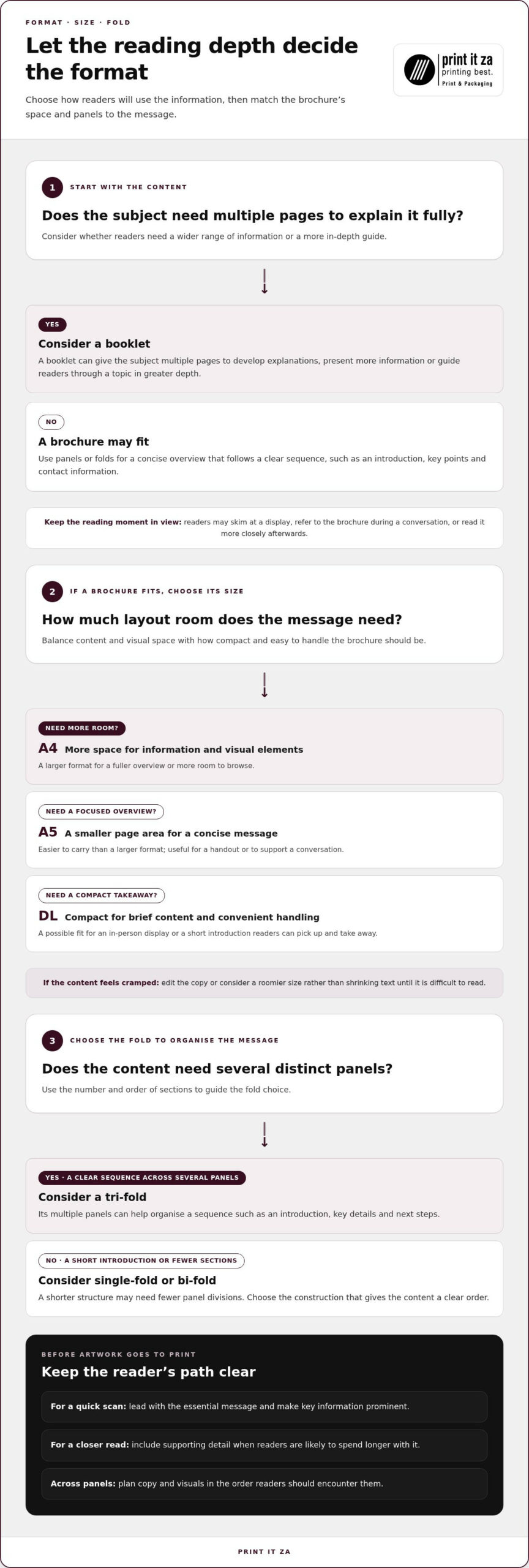
Choose a brochure for a concise overview arranged across panels or folds. It works well when the message can follow a clear sequence, such as an introduction, key points and contact information. Consider a booklet when the subject needs multiple pages to develop explanations, present a wider range of information or guide readers through a topic in greater depth.
Use this quick test before settling on a format:
- Keep it concise: If readers need the main points at a glance, a brochure may fit.
- Allow room to explain: If the message needs more pages to make sense, consider a booklet.
- Plan for the setting: Think about whether people will skim it at a display, refer to it in a conversation or read it more closely afterwards.
Let the message lead. Once you know what readers need and how they’ll use the material, choose a format that makes the information clear and easy to follow. Print It ZA produces brochures tailored to their content and intended audience.
How to Choose Brochure Size, Fold and Construction
The right size and fold depend on how much information you need to include and how readers will handle the brochure. A larger sheet gives you more layout room, while a compact format is easier to carry or pick up from a display. A fold organises that space into sections, helping readers move through your message in a deliberate order.
Print It ZA offers brochure sizes A4, A5 and DL, with single-fold, bi-fold and tri-fold options. These choices give you a practical starting point for custom brochure printing: match the overall size to the content, then choose a fold that makes the information easy to scan.
A4, A5 or DL: how should you decide?
Start with the amount of content. A4 offers more layout room for larger visuals or more copy, while A5 gives you a smaller page area that can keep an overview focused. DL is a compact option for a concise message and easy handling. Use the table to compare the formats by the kind of reading experience you want.
| Option | Content and handling | Useful context |
|---|---|---|
| A4 | More space for information and visual elements; larger to handle. | Presenting a fuller overview or giving readers room to browse. |
| A5 | A smaller page area for a focused message; easier to carry than a larger format. | Handing out a concise overview or supporting a conversation. |
| DL | A compact format for brief content and convenient handling. | In-person displays or situations where readers may pick up and take away a short introduction. |
Use the table as a planning guide, not a rule. If the content feels cramped, edit the copy or consider a roomier size rather than shrinking text until it becomes difficult to read. If the brochure needs to be easy to carry, keep the message selective and make the key information prominent.
Single-fold, bi-fold or tri-fold: what changes?
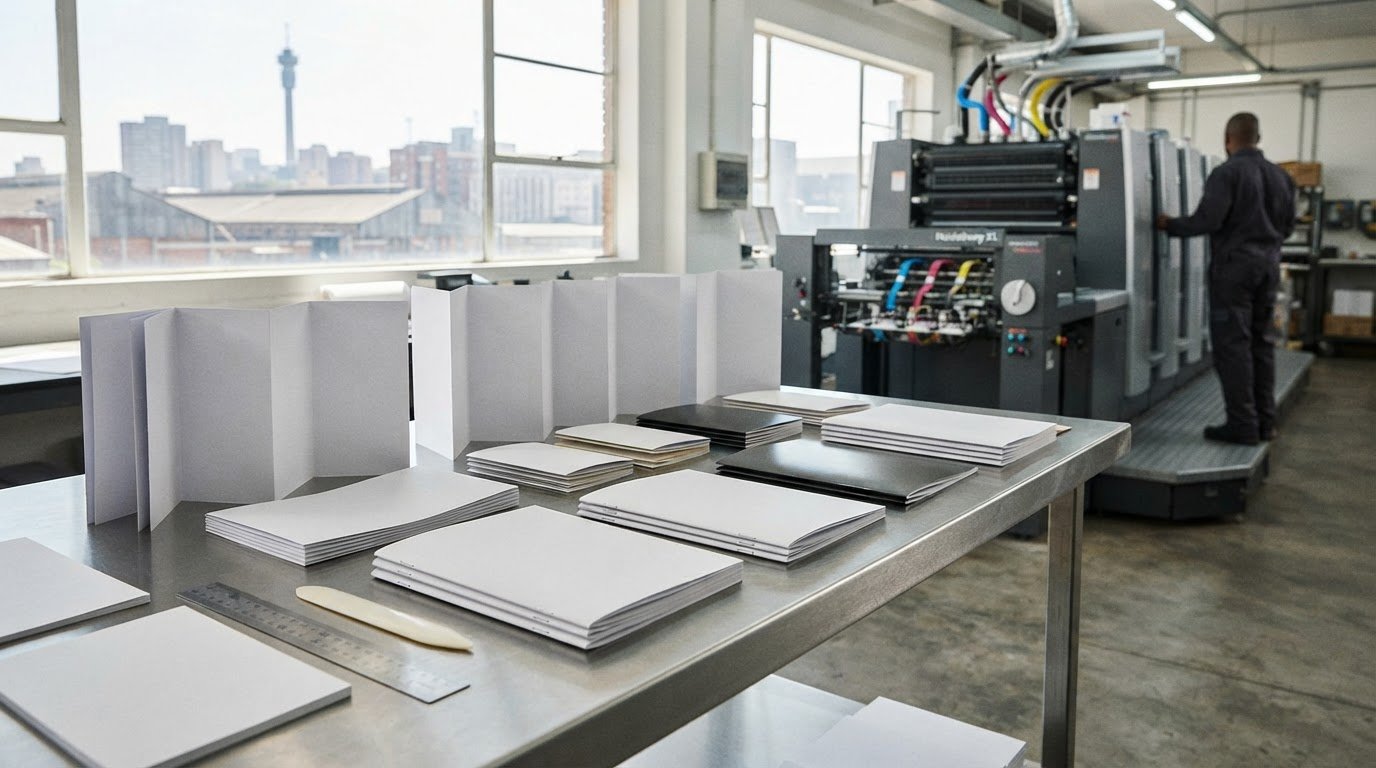
A fold creates sections that guide the reader through the content. Print It ZA offers single-fold, bi-fold and tri-fold options. The best choice depends on how many distinct sections your message needs and the order in which readers should encounter them. A tri-fold, for example, gives you multiple panels to organise a sequence such as an introduction, key details and next steps.
Keep the structure aligned with the message. A short introduction may work well with fewer sections, while information that follows a clear sequence can benefit from more panel divisions. An organisation could use one area to introduce itself, another to explain its offer, and a final area for practical details. Avoid adding copy simply to fill every panel.
Print It ZA’s brochure options include A4, A5 and DL sizes, with single-fold, bi-fold and tri-fold choices. Use those options as the basis of your layout brief, and map each section of content to its intended panel before finalising the artwork. To plan a format around your message, explore custom brochure printing.
How to Compare Brochure Paper, Finish and Printing Choices
Once you’ve planned the format, consider how the brochure should feel in a reader’s hands and how easily its content should be read. Paper and finish influence the presentation, but they should support the message rather than compete with it. A design with detailed copy needs comfortable legibility; a brochure built around strong visuals should give those elements room to stand out.
Brochure format determines how the content is arranged; print method determines how the design is reproduced on paper. Keep those decisions distinct when you prepare your brief. For custom brochure printing, describe the intended look and use, then include your paper preferences and finish requirements in your quote request.
How should paper and finish support the design?
Start with the brochure’s purpose. A piece readers will handle during a conversation has different practical demands from one displayed for people to pick up. Think about the impression you want the paper to create, how often readers may refer to it, and whether the design relies on text, images or both. These considerations help guide paper selection without assuming one option suits every project.
A finish can reinforce the design’s presentation, but clarity comes first. Keep body text, contact details and other essential information easy to read. If a visual treatment draws attention away from those details, it may not be helping the brochure. Decide whether you want a more understated or polished presentation, then describe that preference in your brief.
For a useful quote request, share the brochure’s purpose, intended audience, format, paper preference and any finishing requirements. If you’re open to recommendations, describe the desired feel and how readers will use the piece. Print It ZA tailors paper and finishing choices to the project, connecting the design intent with the finished print.
What should you know about litho and digital printing?
Litho printing transfers an image to paper through a printing plate, while digital printing reproduces the design from a digital file. Both are established print methods. The right approach depends on the project, rather than on a blanket rule that one is always faster, cheaper or better. Print It ZA offers litho and digital printing and can tailor production to the brochure brief.
Share the details that shape the job, including the artwork, quantity, format and paper or finish preferences. This gives the production team a clearer picture of what the brochure needs to achieve. If you have a particular visual result in mind, describe it plainly. A clear brief helps align the print method and materials with the finished piece instead of treating each choice in isolation.
- For readability: Make sure text and key details remain clear against the design.
- For presentation: Describe the feel and impression you want the paper and finish to convey.
- For production: Include your preferences in the quote request so the choices can be tailored to the project.
How to Prepare Brochure Content and Artwork for Printing
A clear brief and carefully checked artwork help keep a brochure project on track. Before design begins, decide who the brochure is for, what readers should understand and what action they should take next. Then organise the content around the selected size and fold instead of squeezing copy into a layout at the last minute. This preparation gives your design and print team a useful foundation for custom brochure printing.
What information belongs in the brochure brief?
Bring the essentials together before layout starts. Include the intended audience, the brochure’s purpose, its main message and the next step you want readers to take. Record your chosen A4, A5 or DL size and preferred fold: single-fold, bi-fold or tri-fold. Gather approved copy, brand assets and image files so the design can be built from the right materials.
Use this workflow to move from a rough idea to a print-ready project:
- Define the audience and purpose. Identify who will read the brochure and where they’ll encounter it, such as at an event, in a sales conversation or at a display.
- Set the key message and action. Choose the main point readers should remember and the next step they should take.
- Select the format. Note the chosen size and fold, along with paper and finish preferences, in the project brief.
- Organise the content by panel. Sketch the reading sequence before finalising the design. Place the introduction, supporting details and call to action where they make sense as the brochure opens and unfolds.
- Prepare and review the artwork. Gather approved text, logos and images. Check the final layout and export a high-resolution PDF for print. Set colours to CMYK to help avoid shifts from RGB screen colours.
How can you reduce artwork and layout problems?
Folded formats need a careful panel check. Review the layout both folded and open, making sure the panels appear in the intended order and the message reads naturally. Then proofread all copy, spelling, contact details and calls to action. Check that images and brand assets are approved versions, and that important information is easy to find.
Don’t leave the final review to one person if several people have supplied content. A second reader can spot a missing detail or outdated contact information before the file is submitted. Keep the approved copy and artwork together, and make sure the final file reflects the size, fold and design choices in your brief.
Print It ZA has an in-house design team to support creative development, alongside in-house printing and binding. For broader guidance on planning a print project, explore this professional printing services guide. Ready to move your brochure brief into production? Request an online brochure quote.
How to Order Custom Brochure Printing with Print It ZA
Once your content and artwork are ready, the ordering process is straightforward: submit an online quote request, approve the quote, upload your files, then move on to production and delivery. Print It ZA handles design, printing and binding in-house rather than outsourcing these stages, keeping the process connected from creative development through to the finished brochures.
What should you include in an online brochure quote request?
Give the quote request enough detail to reflect the brochure you’ve planned. Include its purpose and quantity, your selected size and fold, and any paper or finishing preferences. If you need design support, mention that too. A clear brief helps the quote reflect the print product and options you’ve selected, so you can review the proposed project before approving it.
For a more tailored quote, gather these details first:
- Purpose and audience: Explain what the brochure needs to communicate and who will read it.
- Format and quantity: Specify the size, fold and number of brochures you need.
- Paper and finish: Share your preferences or describe the look and feel you want.
- Artwork and design: Note whether you’re supplying finished files or would like in-house design support.
These details make it easier to align the quote with your brief. If you’re planning a project in Gauteng or Johannesburg, this Johannesburg print shop guide offers useful local print-service context.
What happens after you approve the quote?
After you approve the quote, upload your files so the project can proceed to production. Print It ZA manages design, printing and binding in-house, then arranges delivery. The process moves from quote approval to file submission, production and delivery.
Delivery is available across South Africa. Orders up to 90 kg qualify for free door-to-door delivery, including deliveries in Gauteng and Johannesburg. Include your delivery destination in the order details so the finished brochures can be sent to the right place.
A complete brief connects the brochure you have planned with the print options in your quote. If you’re ready to take the next step, request a custom brochure quote online.
Give Your Next Brochure a Clear Starting Point
A brochure is more than a place to collect information. It can help your audience recognise what matters, remember your message and know what to do next. Give the project a strong start by deciding what you want readers to take away, then shape the design around that intention. A focused brief makes custom brochure printing a purposeful step in your marketing or communications plan.
Think ahead to how the finished piece will be used. Will it support a conversation, introduce your organisation at an event or help customers understand an offer? Keeping that use in view helps you make confident creative choices and gives the project a clear direction from the outset.
Ready to turn your idea into a brochure brief? Start planning your custom brochure project with Print It ZA. Share your format, content and finish preferences in an online quote request to get your project moving.
Frequently Asked Questions
What sizes are available for custom brochure printing?
Print It ZA offers custom brochure printing in A4, A5 and DL sizes. The best choice depends on how the brochure will be used: A4 gives a longer presentation more layout room, while A5 or DL may suit a compact handout. Consider the amount of copy and imagery you need, then choose a size that keeps the content comfortable to read.
Which brochure folds can I choose from?
You can choose a single-fold, bi-fold or tri-fold brochure. Think about how readers should discover the information: a simpler message may work with fewer sections, while a sequence of distinct points can use more panels. For example, you could arrange an introduction, key details and a next step in reading order. Choose a fold that supports the content instead of forcing you to add unnecessary copy.
How do I choose between a brochure and a booklet?
Choose a brochure for a concise overview arranged across panels or folds. A booklet may suit content that needs multiple pages to explain a subject or present more detail. For instance, a brief introduction to an organisation could fit a brochure, while a more extensive guide may need booklet space. Let the amount of information and the reader’s needs guide your decision.
What information should I provide for a brochure printing quote?
Share the brochure’s purpose, quantity, size, fold, and preferred paper and finishing details. Include whether you need design support and provide any available copy or artwork information. For example, a brochure for an event may need a different content plan from one introducing a range of services. A clear request helps the quote reflect the print product and options you’ve selected.
Can Print It ZA help with brochure design?
Yes. Print It ZA has an in-house design team to support creative development, with design, printing and binding handled in-house rather than outsourced. To focus the design process, gather your approved text, logo and images, and explain the audience and main message. If you don’t have finished artwork, these materials and goals give the team a useful starting point.
Does Print It ZA deliver custom brochures across South Africa?
Yes. Print It ZA delivers brochures across South Africa, including to customers in Gauteng and Johannesburg. You can plan a brochure project locally and arrange delivery to its destination elsewhere in the country. Include the delivery destination in your order details so the project is planned with its final location in mind.
Contact Print It ZA today, for a Free Quote and Speedy Service.
Print It ZA, we deliver Printing Best!
Print It ZA print and packaging, South Africa/ ZA.